Caching is one of the most important techniques used to improve website speed and reduce server load.
In Laravel, cache helps store frequently used data temporarily so your application does not need to repeatedly query the database or process heavy logic.
Without cache:
- Database queries run again and again
- APIs become slow
- CPU usage increases
- Website response time becomes poor
With cache:
- Faster page load
- Reduced database usage
- Better scalability
- Improved user experience
What is Cache?
Cache is temporary storage for frequently accessed data.
Example:
Instead of running this query every time:
$products = Product::latest()->take(10)->get();Laravel can store the result in cache:
$products = Cache::remember('latest_products', 3600, function () {
    return Product::latest()->take(10)->get();
});
Now:
- First request → fetches from database
- Next requests → fetches from cache
- Much faster performance
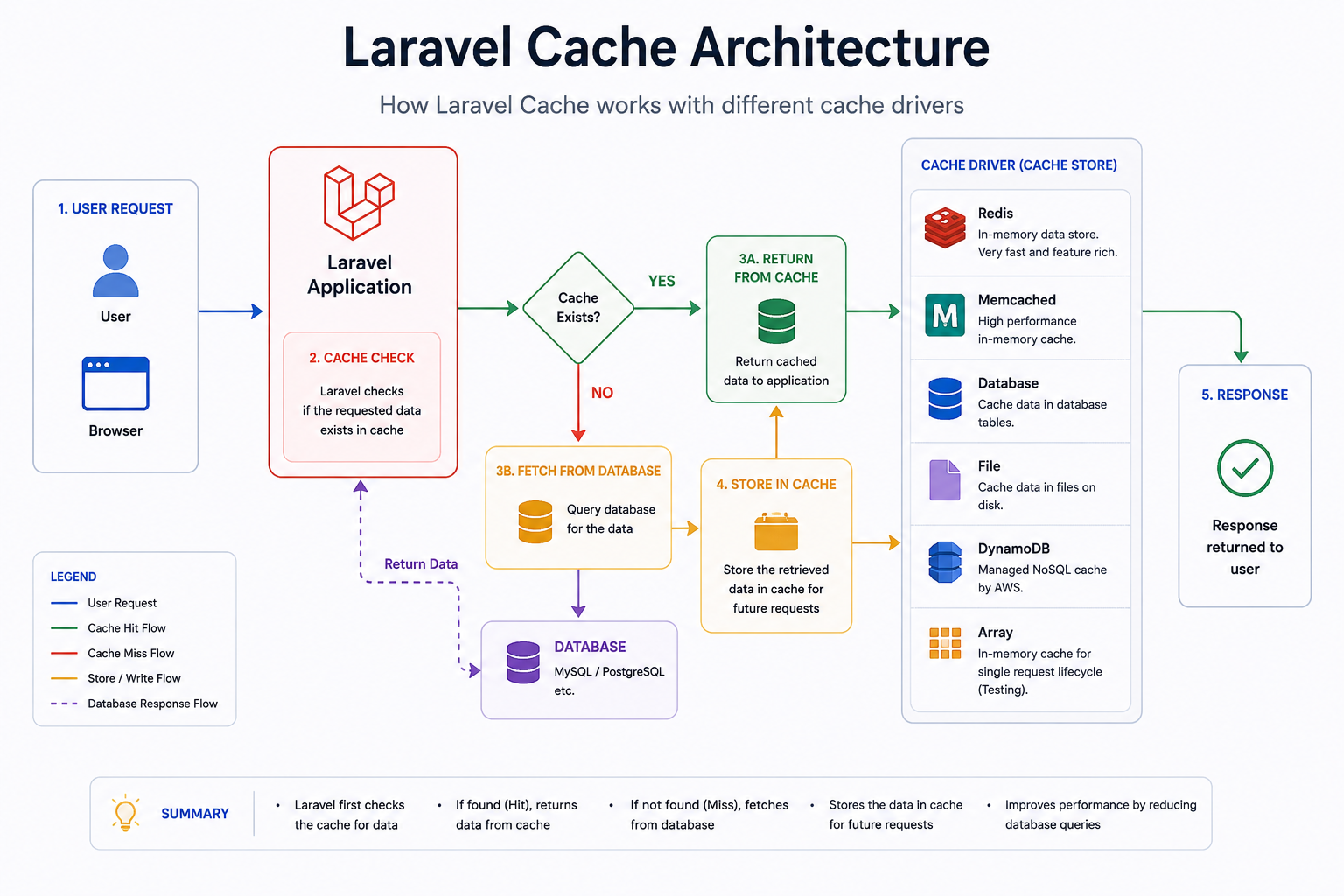
How Laravel Cache Works Internally
Simple Flow
User Request
      ↓
Laravel Checks Cache
      ↓
Cache Exists?
   YES → Return Cached Data
   NO  → Query Database
              ↓
        Store In Cache
              ↓
        Return Response
Laravel Supported Cache Drivers
Laravel supports multiple cache systems.
| Driver | Speed | Best Use Case |
|---|---|---|
| File Cache | Slow | Small projects |
| Database Cache | Medium | Shared hosting |
| Redis | Very Fast | Large scalable apps |
| Memcached | Very Fast | High-speed memory cache |
| DynamoDB | Cloud apps | AWS infrastructure |
| Array Cache | Testing only | Local temporary cache |
1. File Cache
Laravel stores cache files inside:
storage/framework/cacheConfiguration:
CACHE_STORE=fileAdvantages
- Easy setup
- No external server required
Disadvantages
- Slower than Redis
- Not good for large traffic websites
2. Database Cache
Stores cache inside database tables.
Create cache table:
php artisan cache:table
php artisan migrate
Configuration:
CACHE_STORE=databaseAdvantages
- Works on shared hosting
- Easy backup
Disadvantages
- Database becomes overloaded
- Slower than memory cache
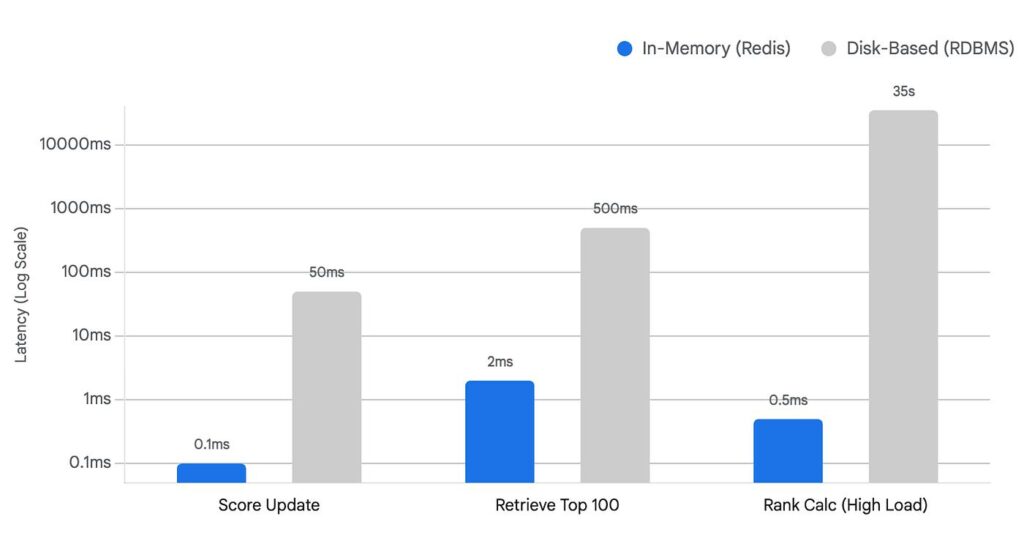
3. Redis Cache (Most Popular)
Redis stores cache in RAM (memory).
This makes it extremely fast.
Install Redis
sudo apt install redis-serverInstall Laravel Redis package:
composer require predis/predisConfiguration:
CACHE_STORE=redisWhy Redis is Powerful
Redis supports:
- Key-value cache
- Queues
- Sessions
- Rate limiting
- Real-time applications
- Pub/Sub
- Expiration handling
Laravel Redis Example
Cache::put('site_name', 'My Laravel App', 3600);

$name = Cache::get('site_name');
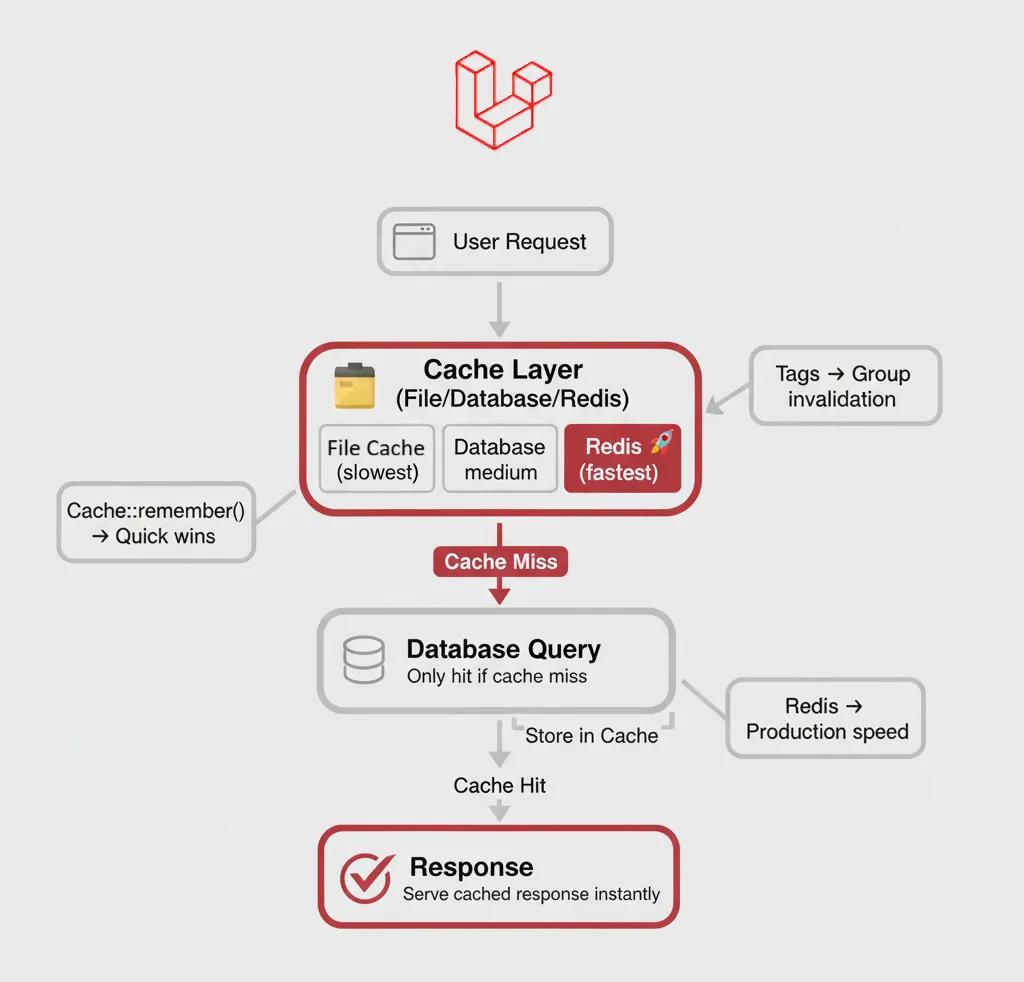
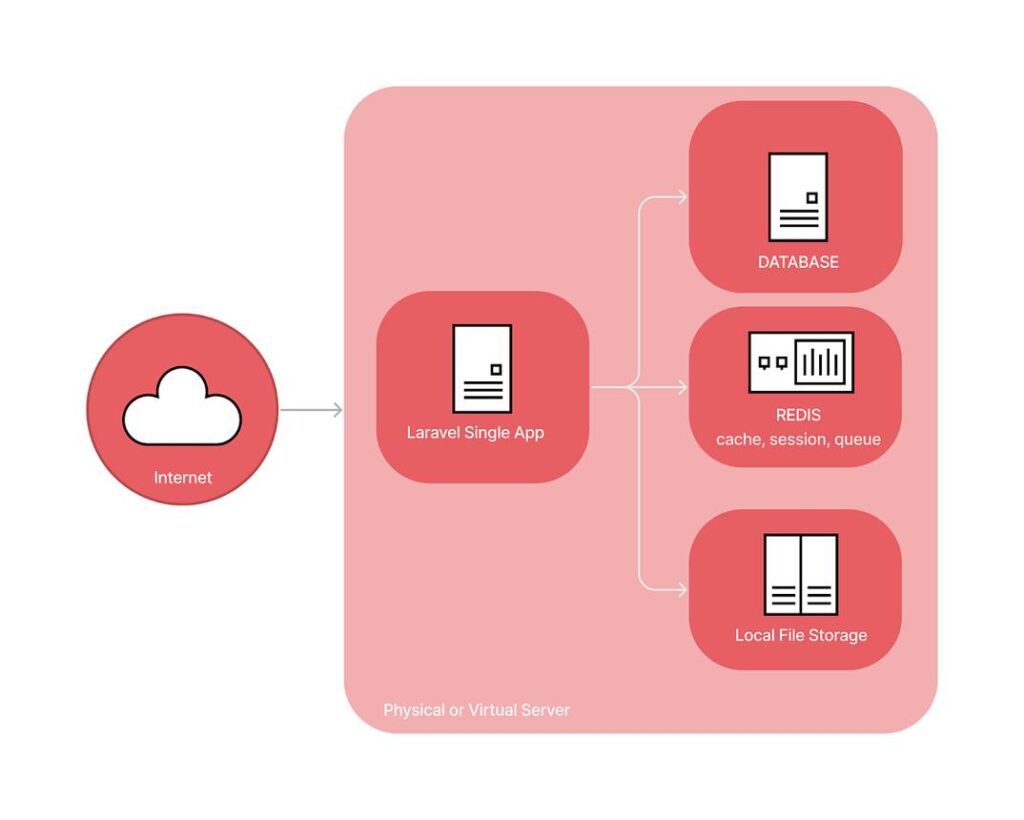
Redis Architecture
4. Memcached
Memcached is another RAM-based cache server.
Very lightweight and fast.
Configuration:
CACHE_STORE=memcachedRedis vs Memcached
| Feature | Redis | Memcached |
|---|---|---|
| Data Persistence | Yes | No |
| Advanced Data Types | Yes | No |
| Pub/Sub | Yes | No |
| Queue Support | Yes | No |
| Speed | Very Fast | Extremely Fast |
| Best For | Full applications | Simple caching |
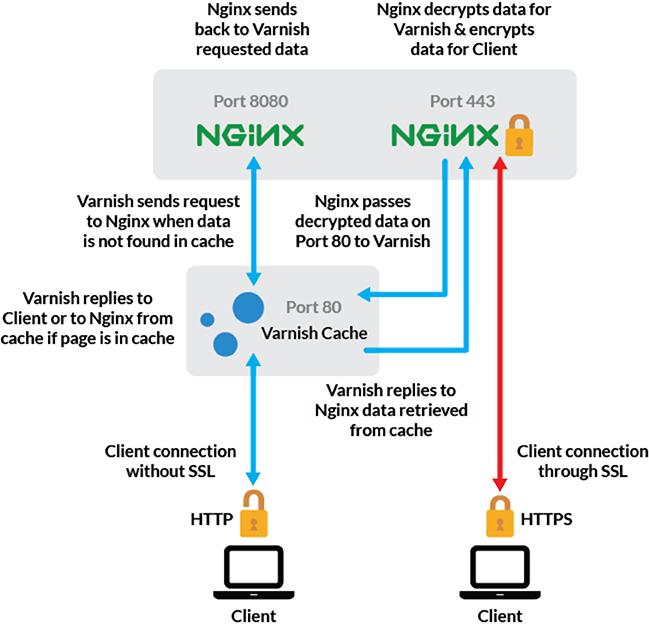
What is Varnish Cache?
Varnish Cache is different from Laravel cache.
Laravel cache works inside application logic.
Varnish works before requests reach Laravel.
How Varnish Works
Visitor Request
      ↓
Varnish Cache Server
      ↓
Cached Page Exists?
   YES → Return Cached HTML
   NO  → Forward Request To Laravel
Varnish Cache Architecture
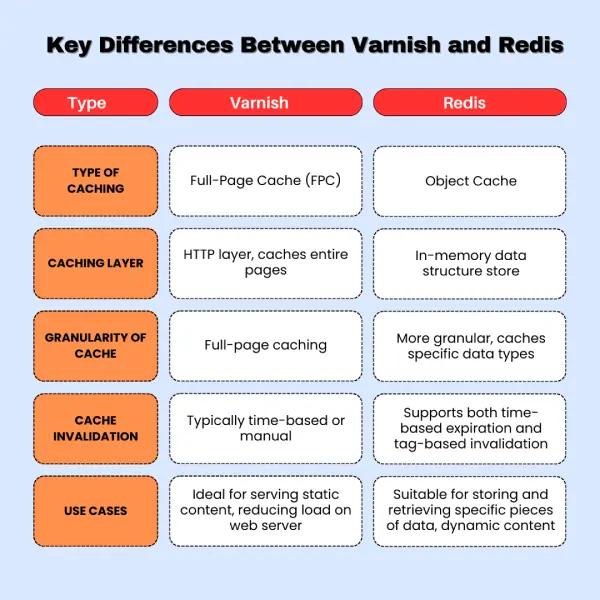
Laravel Cache vs Varnish Cache
| Feature | Laravel Cache | Varnish Cache |
|---|---|---|
| Works Inside App | Yes | No |
| Caches Database Queries | Yes | No |
| Caches Full HTML Pages | Possible | Excellent |
| Handles Sessions | Yes | No |
| API Cache | Yes | Limited |
| Speed | Fast | Extremely Fast |
| Best For | Dynamic apps | High-traffic websites |
Real World Example
Laravel Cache
Caching products:
Cache::remember('products', 3600, function () {
    return Product::all();
});
Varnish Cache
Caching entire page:
GET /productsVarnish returns pre-rendered HTML instantly.
Best Cache Setup for Laravel
Small Websites
File CacheMedium Applications
Redis CacheLarge Scale High Traffic Apps
Varnish + Redis + CDNFull Production Architecture
User
 ↓
CDN
 ↓
Varnish
 ↓
Nginx
 ↓
Laravel
 ↓
Redis Cache
 ↓
MySQL Database
Laravel Cache Commands
Clear Cache
php artisan cache:clearClear Config Cache
php artisan config:clearCache Configurations
php artisan config:cacheRoute Cache
php artisan route:cacheView Cache
php artisan view:cacheImportant Laravel Cache Methods
Store Data
Cache::put('key', 'value', 600);Get Data
Cache::get('key');Remember Cache
Cache::remember('users', 3600, function () {
    return User::all();
});
Remove Cache
Cache::forget('users');Common Mistakes
1. Caching Everything
Avoid caching constantly changing data.
Bad example:
Cache::remember('live_stock', 3600, function () {
    return Stock::all();
});
2. Forgetting Cache Clear
After updating data:
Cache::forget('products');3. Using File Cache for Large Apps
Large applications should use Redis.
Which Cache Should You Choose?
| Project Type | Recommended Cache |
|---|---|
| Blog Website | File Cache |
| WooCommerce / Ecommerce | Redis |
| SaaS Platform | Redis |
| High Traffic News Site | Varnish + Redis |
| API Backend | Redis |
| Enterprise Platform | Redis Cluster |
Final Thoughts
Laravel cache is essential for building fast and scalable applications.
For most Laravel projects:
- Use Redis for application cache
- Use Varnish for full-page HTTP cache
- Use CDN for static assets
- Combine all for maximum performance
A proper caching strategy can reduce server load massively and improve user experience dramatically.
Frequently Asked Questions
Yes. Redis is much faster because it uses memory instead of disk storage.
Yes. Laravel works very well with Varnish as a reverse proxy cache layer.
For simple caching, Memcached is extremely fast.
For advanced features, Redis is better.