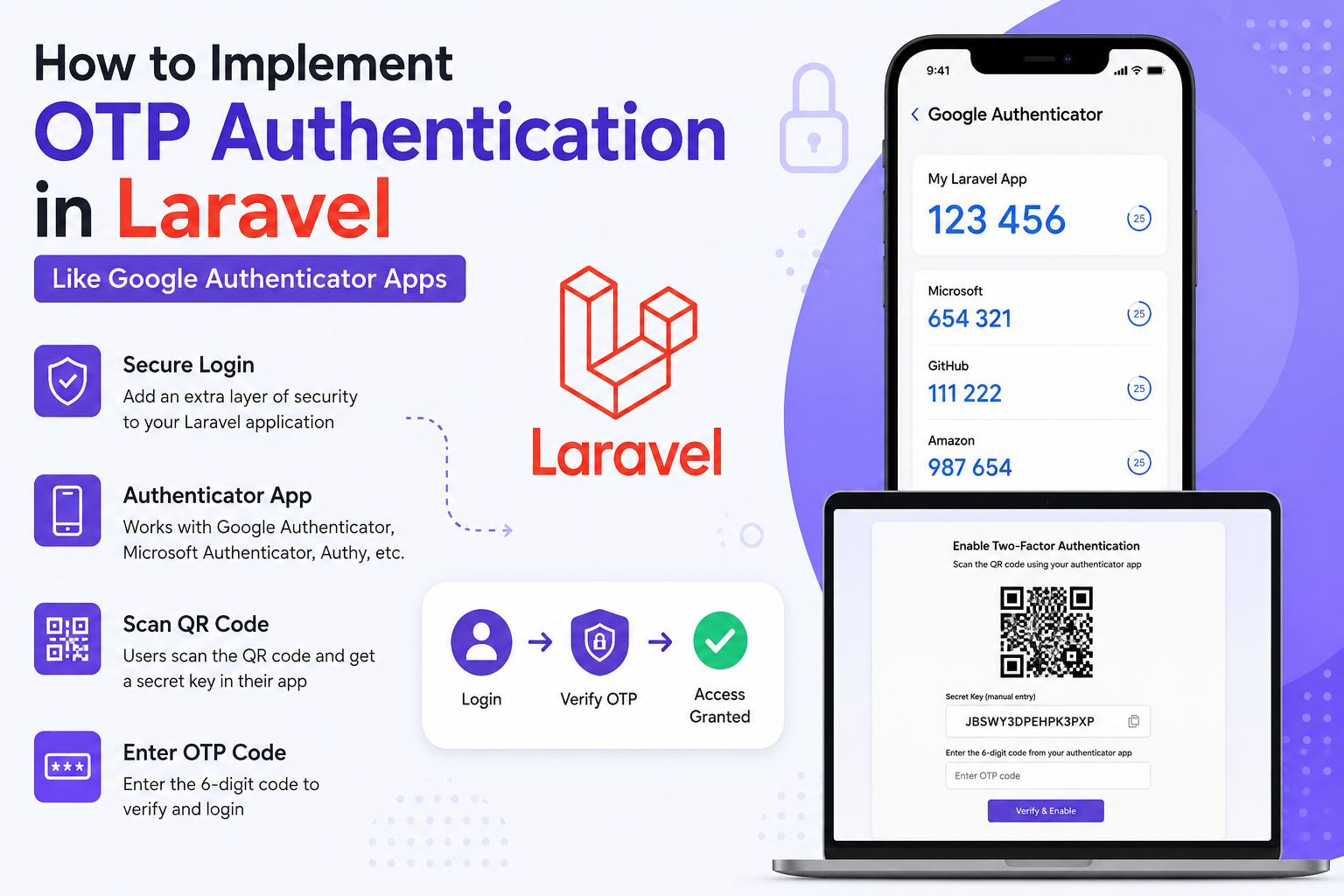
If you want to build OTP (One-Time Password) authentication in Laravel similar to apps like:
- Google Authenticator
- Microsoft Authenticator
- Authy
Then you need to implement TOTP (Time-based One-Time Password) authentication.
This is much more secure than normal SMS OTPs because:
- Codes change every 30 seconds
- Works offline
- Uses secret keys
- Follows RFC 6238 standard
- Used in production by most modern apps
Types of OTP in Laravel
| Type | Example | Recommended |
|---|---|---|
| SMS OTP | Mobile login | ✅ |
| Email OTP | Login/Register | ✅ |
| TOTP Authenticator App | Google Authenticator | ✅✅✅ |
| WhatsApp OTP | Business apps | ✅ |
| Hardware Token OTP | Enterprise security | Advanced |
Best Package for Laravel
Use:
This package helps generate:
- Secret Keys
- QR Codes
- OTP Verification
- TOTP codes
Install Package
composer require pragmarx/google2faFor QR Code generation:
composer require bacon/bacon-qr-codeDatabase Migration
Add OTP secret column to users table.
php artisan make:migration add_2fa_columns_to_users_tableMigration:
Schema::table('users', function (Blueprint $table) {
    $table->text('google2fa_secret')->nullable();
    $table->boolean('google2fa_enabled')->default(false);
});
Run:
php artisan migrateGenerate Secret Key
Controller:
<?php

namespace App\Http\Controllers;

use Illuminate\Http\Request;
use PragmaRX\Google2FA\Google2FA;
use Illuminate\Support\Facades\Auth;

class TwoFactorController extends Controller
{
    public function enable2FA()
    {
        $google2fa = new Google2FA();

        $secret = $google2fa->generateSecretKey();

        $user = Auth::user();

        $user->google2fa_secret = $secret;
        $user->save();

        $QR_Image = $google2fa->getQRCodeInline(
            'MyLaravelApp',
            $user->email,
            $secret
        );

        return view('2fa.enable', [
            'QR_Image' => $QR_Image,
            'secret' => $secret
        ]);
    }
}
Blade View
<h2>Scan QR Code</h2>

<div>
    {!! $QR_Image !!}
</div>

<p>Secret Key: {{ $secret }}</p>
How It Works
User:
- Opens Google Authenticator
- Scans QR code
- App stores secret key
- Generates 6-digit OTP every 30 seconds
Verify OTP
Controller Method:
public function verify2FA(Request $request)
{
    $request->validate([
        'otp' => 'required'
    ]);

    $google2fa = new Google2FA();

    $user = Auth::user();

    $valid = $google2fa->verifyKey(
        $user->google2fa_secret,
        $request->otp
    );

    if ($valid) {

        $user->google2fa_enabled = true;
        $user->save();

        return response()->json([
            'success' => true,
            'message' => 'OTP Verified'
        ]);
    }

    return response()->json([
        'success' => false,
        'message' => 'Invalid OTP'
    ], 422);
}
Verification Form
<form method="POST" action="/verify-2fa">
    @csrf

    <input type="text" name="otp" placeholder="Enter OTP">

    <button type="submit">
        Verify
    </button>
</form>
Login Flow
Typical production flow:
User Login
   ↓
Email + Password Verified
   ↓
Check if 2FA enabled
   ↓
Ask OTP
   ↓
Verify OTP
   ↓
Login Success
Production Security Tips
Encrypt Secret Keys
Very important.
Use Laravel encryption:
$user->google2fa_secret = encrypt($secret);Read:
$secret = decrypt($user->google2fa_secret);Add Rate Limiting
Prevent brute-force attacks.
Route::post('/verify-2fa')
    ->middleware('throttle:5,1');
Recovery Codes
Generate backup recovery codes.
Example:
Str::random(10);Store hashed recovery codes.
Session-based Verification
After successful OTP:
session([
    '2fa_verified' => true
]);
API Authentication Example
For Laravel APIs:
POST /api/loginResponse:
{
  "requires_2fa": true,
  "temp_token": "xxxx"
}
Then:
POST /api/verify-otpAfter verification:
{
  "access_token": "jwt-token"
}
Recommended Laravel Stack
| Feature | Recommended |
|---|---|
| Auth | Laravel Sanctum |
| OTP | Google2FA |
| QR Code | BaconQrCode |
| Queue | Redis |
| SMS OTP | Twilio |
| WhatsApp OTP | WATI |
| Email OTP | Laravel Notifications |
Difference Between SMS OTP & Authenticator OTP
| Feature | SMS OTP | Authenticator OTP |
|---|---|---|
| Internet Required | Yes | No |
| SIM Swap Risk | High | Low |
| More Secure | ❌ | ✅ |
| Cost | SMS charges | Free |
| Enterprise Grade | Medium | High |
Advanced Features
You can also implement:
- Device remembering
- Trusted devices
- OTP expiry handling
- Multi-device authentication
- Backup recovery codes
- WebAuthn / Passkeys
- Biometric login
Full Laravel Routes
Route::middleware('auth')->group(function () {

    Route::get('/enable-2fa', [TwoFactorController::class, 'enable2FA']);

    Route::post('/verify-2fa', [TwoFactorController::class, 'verify2FA']);
});
Recommended Folder Structure
app/
 ├── Http/
 │    ├── Controllers/
 │    │      └── TwoFactorController.php
 │
 ├── Services/
 │      └── OTPService.php
 │
 ├── Actions/
 │      └── VerifyOTPAction.php
Real-World Apps Using TOTP
- Google Authenticator
- Microsoft Authenticator
- LastPass Authenticator
- Duo Mobile
- Authy
Final Recommendation
For modern Laravel applications:
✅ Use Password + TOTP
✅ Store encrypted secrets
✅ Add recovery codes
✅ Use throttling
✅ Use Sanctum/JWT for APIs
✅ Use queues for SMS/email OTPs
Avoid relying only on SMS OTP for sensitive applications.
Frequently Asked Questions (FAQ)
OTP authentication in Laravel adds an extra security layer by asking users to enter a temporary verification code during login.
A popular package is:
PragmaRX Google2FA
It supports Google Authenticator, QR code generation, and TOTP verification.
Laravel OTP works with apps like:
- Google Authenticator
- Microsoft Authenticator
- Authy
Yes. TOTP-based authenticator apps generate OTP codes offline using the secret key stored on the device.
Yes. Laravel OTP authentication can be integrated with APIs using Laravel Sanctum or JWT authentication for mobile and web applications.