When developing applications in Laravel, maintaining database consistency is extremely important. Imagine a situation where an order is created successfully, but the payment process fails. Without proper handling, incomplete or corrupted data may remain in the database.
This is where Laravel Database Transactions become useful.
Database transactions ensure that a group of database operations either:
- Complete successfully together
- Or fail together without saving partial data
Laravel provides a clean and powerful way to handle transactions using:
DB::beginTransaction()

DB::commit()

DB::rollback()
What is a Database Transaction?
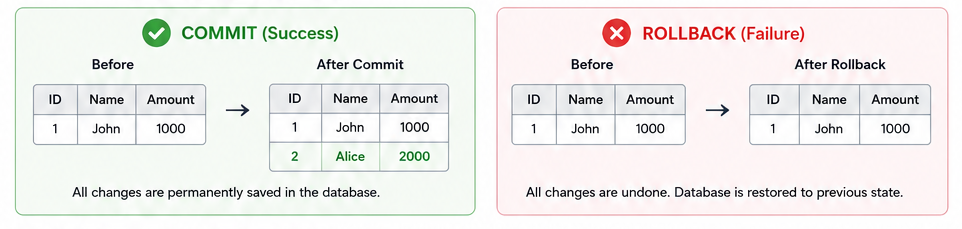
A database transaction is a collection of database operations treated as a single unit.
If all operations succeed:
✅ Changes are permanently saved using commit()
If any operation fails:
❌ All previous changes are reverted using rollback()
This helps maintain database integrity and prevents inconsistent data.
Why Use Transactions in Laravel?
Transactions are useful when multiple database operations depend on each other.
Common Use Cases
- Order processing
- Payment systems
- Inventory updates
- Wallet balance transfers
- User registration with multiple tables
- Booking systems
Without transactions, partial data may be stored if an error occurs.
Laravel Transaction Flow

Basic Flow
- Start Transaction
- Execute Queries
- If Success → Commit
- If Error → Rollback
Laravel Transaction Example
Using beginTransaction, commit, and rollback
use Illuminate\Support\Facades\DB;

DB::beginTransaction();

try {

    DB::table('users')->insert([
        'name' => 'John Doe',
        'email' => 'john@example.com'
    ]);

    DB::table('profiles')->insert([
        'user_id' => 1,
        'bio' => 'Laravel Developer'
    ]);

    DB::commit();

} catch (\Exception $e) {

    DB::rollback();

    return response()->json([
        'message' => 'Transaction Failed'
    ]);
}
Understanding Commit & Rollback
DB::commit()
commit() permanently saves all database changes made during the transaction.
Example
DB::commit();
Result
✅ Data is saved successfully.
DB::rollback() rollback() reverts all queries executed during the transaction.
Example
DB::rollback();
Result
❌ No partial data remains in the database.
Real-World Example: Order Processing System
Imagine an eCommerce application.
The application performs:
- Create Order
- Add Order Items
- Process Payment
If payment fails, the order and order items should not remain in the database.

Example
DB::beginTransaction();

try {

    $order = Order::create([
        'user_id' => 1,
        'total' => 1000
    ]);

    OrderItem::create([
        'order_id' => $order->id,
        'product_id' => 10,
        'price' => 1000
    ]);

    // Payment Success

    DB::commit();

} catch (\Exception $e) {

    DB::rollback();

    return response()->json([
        'message' => 'Order Failed'
    ]);
}
Cleaner Method Using DB::transaction()
Laravel provides a simplified helper method.
DB::transaction(function () {

    DB::table('users')->insert([
        'name' => 'Alice'
    ]);

    DB::table('roles')->insert([
        'role' => 'admin'
    ]);

});
Laravel automatically:
- Commits if successful
- Rolls back if an exception occurs
Best Practices for Laravel Transactions
1. Always Use try-catch
Handle exceptions properly to avoid application crashes.
2. Keep Transactions Short
Avoid long-running operations inside transactions.
Do not:
- Send emails
- Upload files
- Call external APIs
inside transactions.
3. Log Errors
Log::error($e->getMessage());
This helps during debugging.
4. Use Transactions Only When Needed
Simple single-table inserts usually do not require transactions.
Common Mistakes
Forgetting commit()
If commit is missing, data may not be saved.
Forgetting rollback()
Failed operations may leave incomplete data.
Running Heavy Operations Inside Transactions
This may lock database tables and reduce performance.
Laravel Transaction Methods Summary
| Method | Purpose |
| DB::beginTransaction() | Start Transaction |
| DB::commit() | Save Changes |
| DB::rollback() | Undo Changes |
| DB::transaction() | Automatic Transaction Handling |
Conclusion
Laravel database transactions are essential for maintaining data integrity and preventing inconsistent database records.
By using:
- DB::beginTransaction()
- DB::commit()
- DB::rollback()
You can ensure that all related database operations succeed together or fail safely.
Transactions are especially important in applications involving:
- Payments
- Orders
- Wallets
- Booking systems
- Inventory management
Using transactions properly helps build reliable and production-ready Laravel applications.
Frequently Asked Questions
DB::commit() permanently saves all database changes made during a transaction.
DB::rollback() reverts all database operations executed during the transaction.
Use transactions when multiple related database operations must succeed or fail together.
Yes, when using DB::transaction() Laravel automatically rolls back if an exception occurs.