Learn how Laravel morphs() works with real examples, migrations, model relationships, database structure, and best practices for scalable applications.
What is morphs() in Laravel?
In Laravel, the morphs() method is used to create polymorphic relationships.
It allows multiple models to share the same relationship table.
For example:
- Posts can have comments
- Videos can have comments
- Products can have comments
Instead of creating separate tables like:
- post_comments
- video_comments
- product_comments
Laravel allows you to store everything in a single table:
comments
using polymorphic relationships.
Laravel morphs() Syntax
$table->morphs('commentable'); This automatically creates two database columns:
- commentable_id
- commentable_type
What Does morphs() Create?
Internally, Laravel creates:
$table->unsignedBigInteger('commentable_id');

$table->string('commentable_type');

$table->index([
    'commentable_id',
    'commentable_type'
]);
Why Use Polymorphic Relationships?
Polymorphic relationships help you:
✅ Reduce duplicate tables
✅ Create reusable relationships
✅ Build scalable applications
✅ Keep database structure clean
✅ Simplify application logic
Real-World Example
Imagine a blogging platform where:
- Posts can have comments
- Videos can also have comments
Instead of creating multiple comment tables, Laravel stores:
| id | message | commentable_id | commentable_type |
| 1 | Nice article | 5 | App\Models\Post |
| 2 | Great video | 2 | App\Models\Video |
Laravel identifies:
- Which model owns the comment
- Which record belongs to that model
using:
- commentable_id
- commentable_type
Creating Migration Using morphs()
comments Migration
Schema::create('comments', function (Blueprint $table) {
    $table->id();
    $table->text('message');
    $table->morphs('commentable');
    $table->timestamps();
});
Database Table Structure
| Column | Type |
| id | BIGINT |
| message | TEXT |
| commentable_id | BIGINT |
| commentable_type | VARCHAR |
| created_at | TIMESTAMP |
| updated_at | TIMESTAMP |
Laravel Model Relationships
Post Model
class Post extends Model
{
    public function comments()
    {
        return $this->morphMany(
            Comment::class,
            'commentable'
        );
    }
}
Video Model
class Video extends Model
{
    public function comments()
    {
        return $this->morphMany(
            Comment::class,
            'commentable'
        );
    }
}
Comment Model
class Comment extends Model
{
    public function commentable()
    {
        return $this->morphTo();
    }
}
Insert Data Example
Add Comment to Post
$post = Post::find(1);
$post->comments()->create([
    'message' => 'Excellent tutorial'
]);
Laravel automatically stores:
| Column | Value |
| commentable_id | 1 |
| commentable_type | App\Models\Post |
Fetch Relationship Data
Get All Comments of Post
$post->comments; Get Parent Model from Comment
$comment->commentable; Laravel automatically detects whether the comment belongs to:
- Post
- Video
- Product
- Any other model
Types of Morph Methods in Laravel
1. morphs()
Creates standard BIGINT polymorphic keys.
$table->morphs('imageable'); 2. nullableMorphs()
Creates nullable morph columns.
$table->nullableMorphs('imageable'); 3. uuidMorphs()
Uses UUID instead of BIGINT.
$table->uuidMorphs('imageable'); 4. nullableUuidMorphs()
Nullable UUID polymorphic relationship.
$table->nullableUuidMorphs('imageable'); Common Use Cases of morphs()
| Feature | Morph Name |
| Comments | commentable |
| Images | imageable |
| Likes | likeable |
| Tags | taggable |
| Attachments | attachable |
Visual Understanding of Laravel Polymorphic Relationships
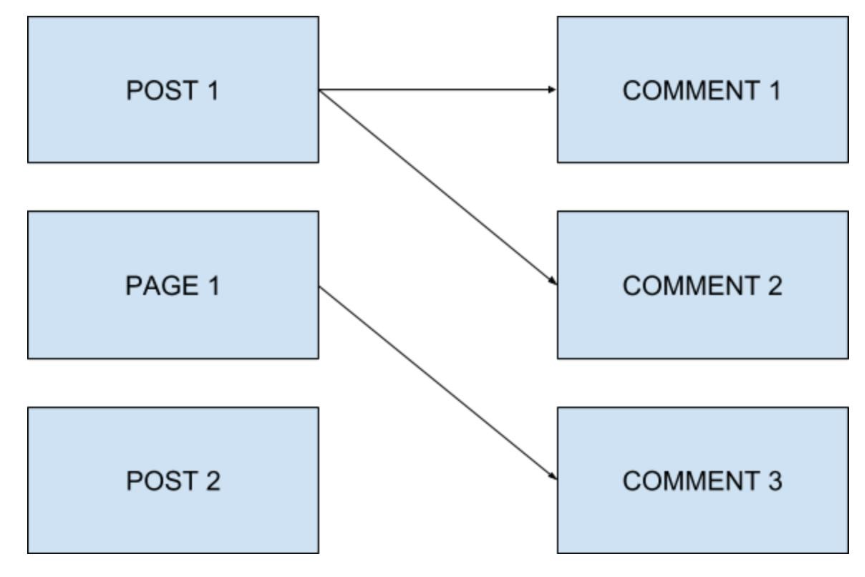
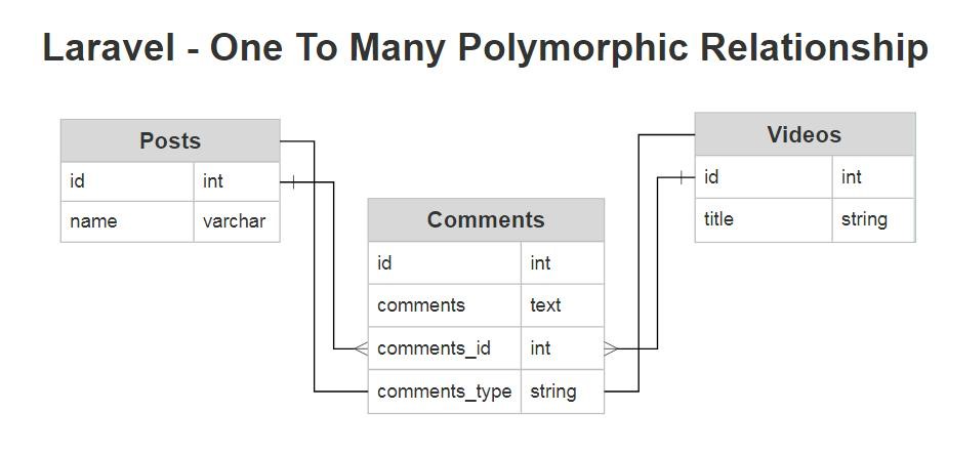
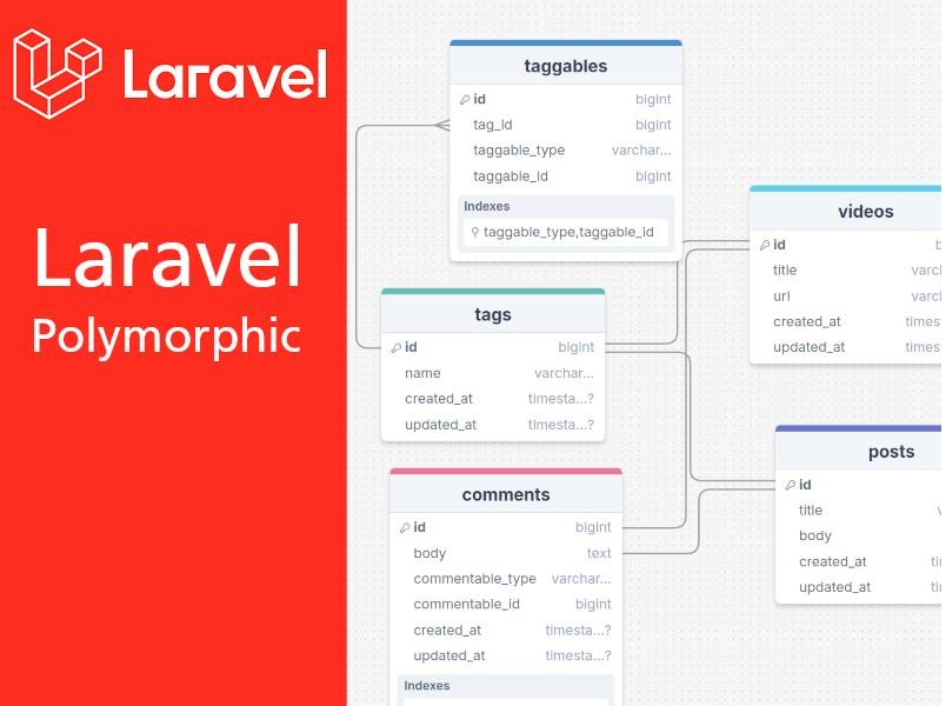
Traditional vs Polymorphic Structure
Traditional Database Design
- posts
- videos
- post_comments
- video_comments
Polymorphic Database Design
- posts
videos
comments - Much cleaner and scalable.
Performance Considerations
Advantages
✅ Reusable architecture
✅ Fewer database tables
✅ Easier maintenance
✅ Flexible relationships
✅ Better scalability
Disadvantages
❌ Slightly complex SQL queries
❌ Reporting queries can be harder
❌ Requires indexing for large datasets
Best Practices for Laravel morphs()
1. Use Meaningful Morph Names
Good:
- commentable
- imageable
- taggable
Bad:
- data
- item
- object
2. Use Morph Maps
Instead of storing:
App\Models\Post
store shorter aliases.
AppServiceProvider
use Illuminate\Database\Eloquent\Relations\Relation;
Relation::enforceMorphMap([
    'post' => Post::class,
    'video' => Video::class,
]);
Now database stores:
- post
- video
This improves:
✅ Readability
✅ Security
✅ Database cleanliness
Final Thoughts
Laravel morphs() is one of the most powerful features for designing scalable and reusable database relationships.
It helps developers avoid duplicate tables while keeping applications flexible and maintainable.
If your application has shared features like:
- comments
- likes
- tags
- images
- attachments
then polymorphic relationships are the perfect solution.
Mastering Laravel polymorphic relationships will make your application architecture much cleaner and more professional.
Frequently Asked Questions (FAQ)
morphs() creates polymorphic relationship columns in Laravel migrations.
It creates:
- _id
- _type
columns automatically.
A polymorphic relationship allows multiple models to share one relationship table.
Use it when multiple models share common functionality like:
- comments
- images
- likes
- tags